
FREE TOOLS · PRACTICAL GUIDES
How to host a trivia night with a free app (phones as buzzers)
A good trivia night needs three things: questions people enjoy, a fair way to collect answers and a host who is not buried in score sheets. Late Hour Trivia handles the second and third for you. It runs in a web browser, puts everything on one big screen and lets teams answer on their own phones. Here is how to plan the night, set it up in a few minutes and keep the room happy until the last round.
The short answer
You need a laptop, a TV or projector and a list of questions. Open Late Hour Trivia in the browser, choose your questions, let teams join with their phones and press Space to move through the night. The app keeps time, hides the answers until you reveal them and keeps the scoreboard up to date.
- Open journeyengine6.com/trivia on a laptop connected to the big screen.
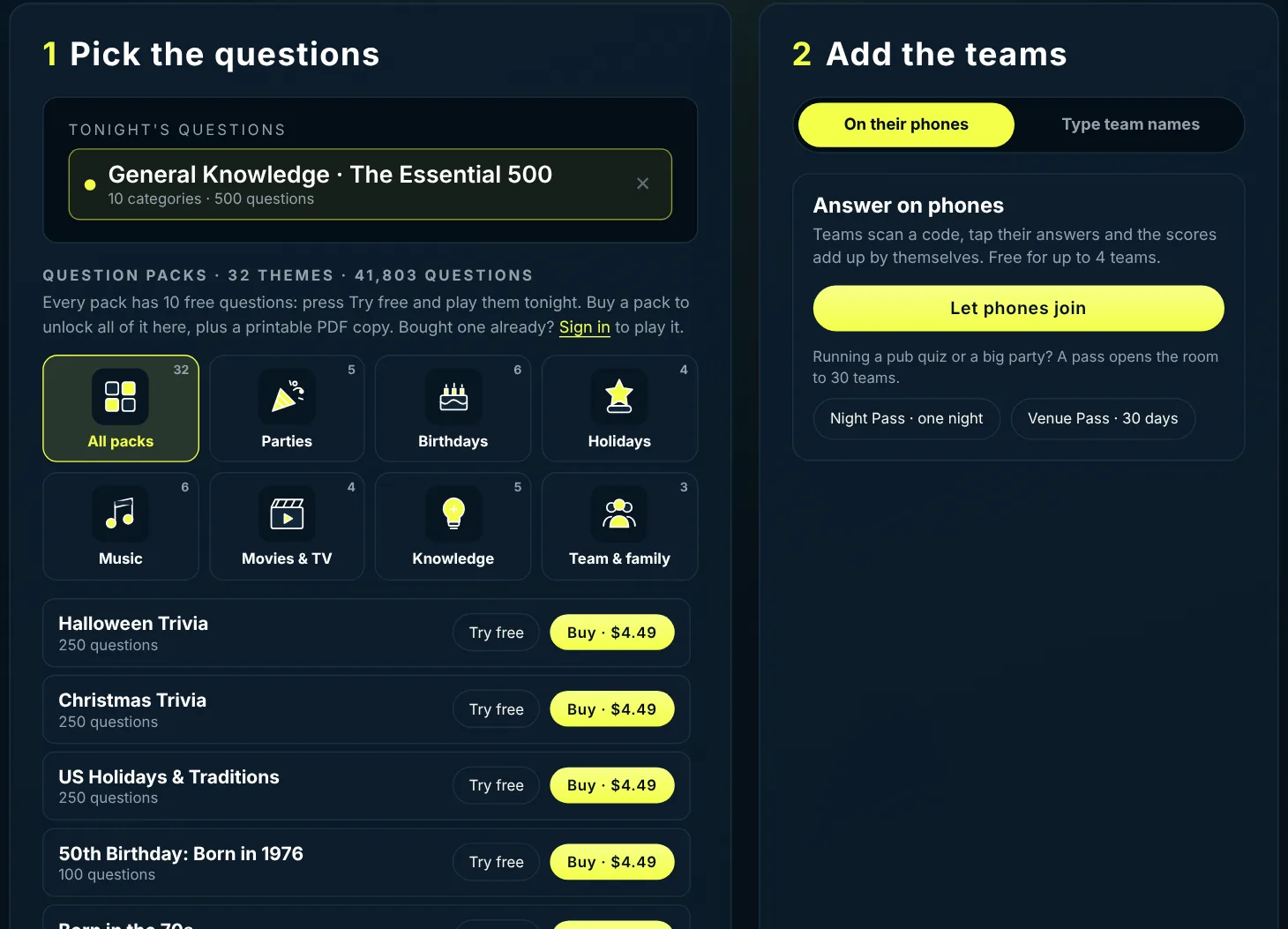
- Pick the questions: the free 500 question general knowledge pack, a free 10 question sample of any themed pack, or a full pack you own.
- Add the teams: they scan a code and answer on their phones, or you type their names in and score by hand.
- Run the night: Space moves on, R reveals the answer, S shows the scores, F goes fullscreen.
What you need on the night
The equipment list is short, and most venues and living rooms already have it.
- A laptop or desktop with an up-to-date browser such as Chrome, Edge, Safari or Firefox.
- A TV, projector or large monitor. An HDMI cable is the most reliable connection; screen casting works too if the picture stays smooth.
- Wi-Fi or mobile data for the teams. Each team uses one phone. Nobody installs an app or creates an account.
- Speakers if you want the sound effects. They make the reveal and the winner moment land properly.
- A clear spot for the host, close enough to the laptop to press a key and far enough to talk to the room.
Tip: open the game in its own browser tab rather than inside another page, then press F. Fullscreen removes everything except the question and the scores.
Choosing the questions
The questions decide whether people come back next week. Late Hour gives you three ways to fill the night, and you can mix them.
The built in pack, General Knowledge: The Essential 500, covers ten categories and is free every time you play. It is a safe base for any crowd.
Themed packs cover holidays, milestone birthdays, bachelorette and girls nights, music, movies and TV, video games, team building, Bible trivia and big general knowledge sets. There are more than 40,000 questions across the packs. Every pack lets you play 10 questions free, which is enough for a bonus round or to test whether a theme suits your crowd.
When you buy a pack, it unlocks inside the game the next time you sign in with the same email, and you also get a printable PDF copy. You can load several packs and mix them into one night.
- Pubs and bars: one general knowledge round, one music round, one theme that matches the week (Halloween, a big game, a holiday).
- Birthday parties: a nostalgia pack for the decade the guest of honour grew up in, plus a round of questions about them.
- Office team building: general knowledge and a team building pack, kept light and inclusive.
- Family nights: the kids pack mixed with general knowledge so everyone has a round they can win.
How phones work as buzzers
On the Setup screen, choose On their phones and press Let phones join. A QR code and a short room code appear on the big screen. Each team scans the code, or opens journeyengine6.com/join and types it, then picks a team name.
When a question appears, every team sees the answer options on their phone and taps A, B, C or D. The big screen shows how many teams have answered, never what they chose. When you press R, the answer is revealed, the phones show who was right and the points are added for you.
This removes the slowest part of a pub quiz: collecting paper, checking answers and adding up scores. It also stops the loudest table from shouting the answer before the others have decided.
- Free phone rooms take up to 4 teams, which suits home parties and small groups.
- A Night Pass opens one room to 30 teams for the night. It is used only when you press Unlock, so you can buy it ahead of time.
- A Venue Pass gives every room 30 spots for 30 days. It is made for weekly quiz nights and does not renew by itself.
- Prefer pen and paper? Choose Type team names. There is no limit on teams, and you award points with a click.
Setting the rules and the scoring
Every room has its own idea of fair. Late Hour lets you set the rules before you start, or pick a preset and go.
- Timer: give each question a fixed time, or turn it off for a relaxed night.
- Points: choose how much a correct answer is worth.
- Steals: give the other teams a chance to take points the first team missed.
- Negative marking: take points away for wrong answers when you want people to think before they tap.
- Open play or team rotation: everyone answers every question, or teams take turns.
If you are new to hosting, start with open play, a timer and no negative marking. It keeps the pace up and nobody leaves with a negative score.
Running the night from the keyboard
Once the game starts, you barely need the mouse. That matters when you are standing up, talking to the room and reading the question out loud.
| Key | What it does |
|---|---|
| Space | Move to the next step: show the question, start the timer, go on |
| R | Reveal the answer and add the points |
| S | Show the scoreboard |
| F | Switch fullscreen on or off |
A good rhythm: read the question, give the room the full timer, reveal with R, then show the scoreboard every five questions with S.
Make it look like your venue
Upload your logo and add your pub or event name in the settings, and it appears on the game screen. Several colour themes are built in, from a dark Journey Engine look to a warm tavern style, so the screen fits the room.
Every finished game is saved in History in the browser you played on, with printable results. Venues use it to keep a season leaderboard; families use it to settle who actually won last Christmas.
A format that works for most nights
Most quiz nights run best at 60 to 90 minutes. Long enough to feel like an event, short enough that the energy stays up.
- Welcome and rules: 5 minutes. Get every team joined before the first question.
- Round 1, general knowledge: 10 questions. Easy wins build confidence.
- Round 2, a theme: 10 questions from a pack that fits the crowd.
- Short break and scoreboard: 10 minutes. Sell drinks, chat, tease the leaders.
- Round 3, music or movies: 10 questions.
- Final round with double points or steals turned on: 10 questions. It keeps every table in the game.
- Winner moment and photo: the app plays a winner sound. Make a fuss of it.
When you want questions about your people
Some nights call for questions nobody else has: a birthday quiz full of inside jokes, a wedding game about the couple, an office quiz about your team, or a weekly series for a venue. You can request custom trivia, and it is written for your event and plays in Late Hour like any other pack.
Questions people ask
Is Late Hour Trivia really free?
Yes. Hosting is free, the 500 question general knowledge pack is free and every themed pack has a 10 question free sample. Full packs and the 30 team passes are one-off purchases with no subscription.
Do the players need to download an app?
No. Teams scan a QR code or open journeyengine6.com/join on their phone and type the room code. It works in the phone browser, with no account.
How many teams can play?
Up to 4 teams can answer on phones for free. A Night Pass or Venue Pass opens the room to 30 teams. If you type team names in and score by hand, there is no limit.
Can I use it for a pub quiz in my bar?
Yes. Add your logo and venue name, run it on your TV and use a Venue Pass for weekly nights with up to 30 phone teams.
Can I print the questions?
Every full pack you buy includes a printable PDF, so you can run a paper quiz or keep a backup copy.
Does it work without internet?
The host screen needs the page to load, and phone answers need a connection. For a night without phones, type the team names in and score by hand.
PUT IT INTO PRACTICE
Host your next quiz night tonight.
Open the game on a laptop, plug it into the TV and press Let phones join. The starter questions are free, and every pack has 10 free questions to try.
Start a free trivia night →