
FREE TOOLS · PRACTICAL GUIDES
How to make a word search with your own words (free maker)
A word search made from your own words is more fun than any generic puzzle book. Spelling words for a class, names for a birthday, vocabulary for a language lesson or inside jokes for a party. The free word search maker builds the puzzle, hides your words and gives you an answer key. Here is how to get a puzzle that is the right level for the people solving it.
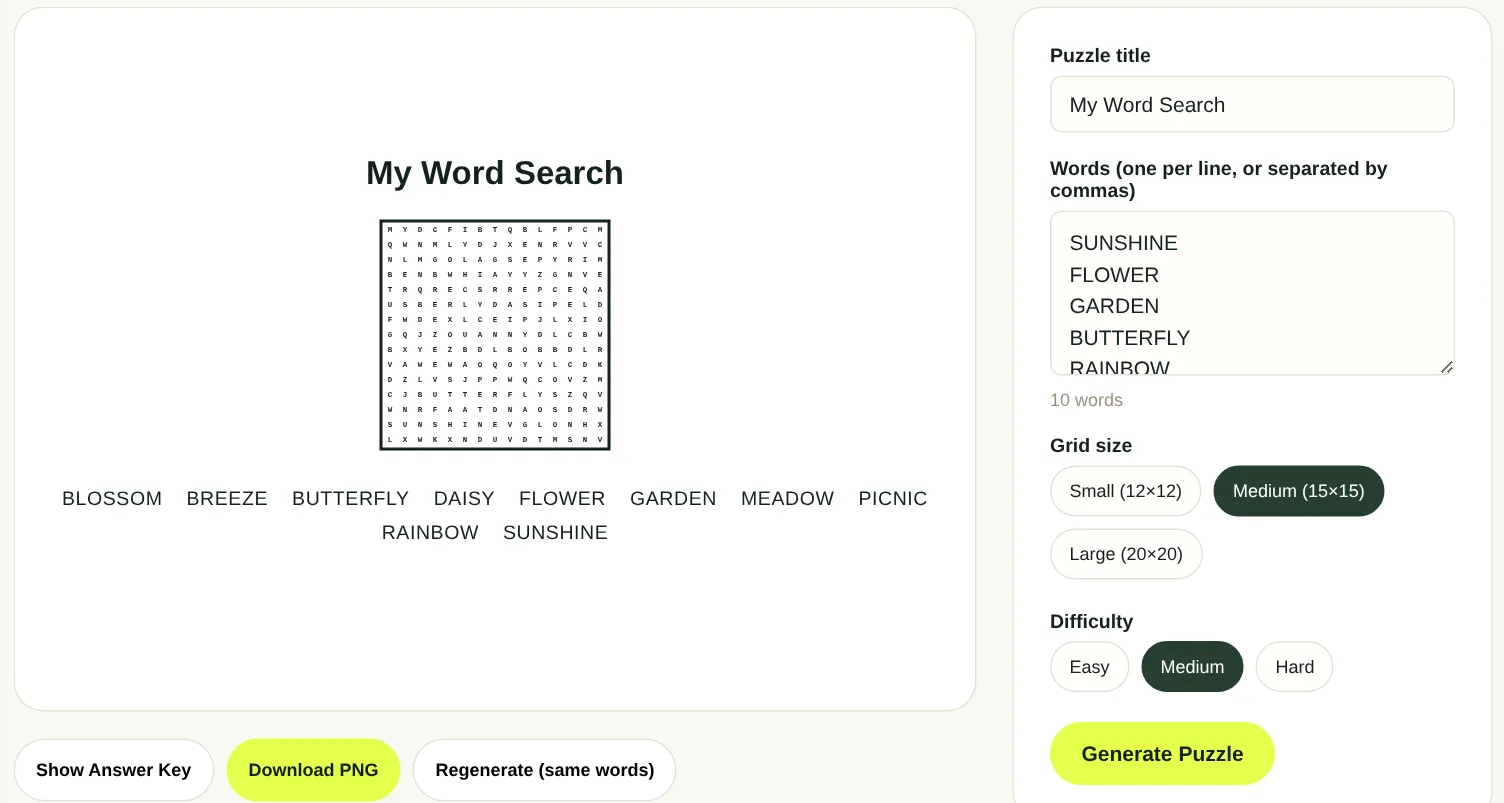
The short answer
- Give your puzzle a title.
- Type your words, one per line or separated by commas.
- Choose a grid size: Small (12 × 12), Medium (15 × 15) or Large (20 × 20).
- Choose a difficulty: Easy, Medium or Hard.
- Press Generate puzzle, check it, then download the PNG and print it.
What the difficulty levels change
Difficulty in a word search is mostly about direction. Words that read left to right are easy to spot; words that run backwards or diagonally are much harder, because your eye is not used to reading them.
| Level | Directions used | Good for |
|---|---|---|
| Easy | Across and down | Young children, early readers and large print puzzles |
| Medium | Across, down and diagonal | Most adults and older children |
| Hard | All eight directions, including backwards and upwards | Puzzle fans and anyone who finds the others too quick |
For a mixed group, Medium is the safe choice. Everyone finds some words quickly, and the diagonals keep it interesting.
Choosing the grid size
The grid has to fit your longest word, and it should not be so big that the words get lost. A rough guide:
- Small 12 × 12: 8 to 12 short words. Words up to 12 letters. Ideal for young children and quick activities.
- Medium 15 × 15: 10 to 18 words. The classic puzzle book size.
- Large 20 × 20: 15 to 25 words, including long ones. A longer, harder session.
If a long word does not fit, the tool cannot place it. Use a larger grid or a shorter word.
Writing a word list that works
The best puzzles come from a good list. A few simple rules help.
- Stick to one theme so the puzzle feels like a set: a holiday, a topic you are teaching, a family, a hobby.
- Mix short and long words. Short words fill the gaps and long words feel like a win.
- Avoid words that sit inside other words in the same list, such as CAT and CATERPILLAR. Solvers find the short one twice and get confused.
- Check spelling twice. A typo in the list means a word nobody can find.
- For names with spaces, join them (NEWYORK) or choose single words. The grid only holds letters.
Generate, check and regenerate
Press Generate puzzle to see the result. Use Show answer key to check that every word is placed and that the layout feels fair.
Not happy with the layout? Regenerate (same words) builds a new arrangement from the same list. It is a quick way to make two different versions for two groups, so neighbours cannot copy each other.
Printing a clean page
The puzzle downloads as a PNG image. Open it in your usual photo viewer or print dialog.
- Choose fit to page and portrait orientation so the grid and the list both stay on the page.
- Check the print preview before you print a whole class set.
- Print the answer key separately for the teacher, the host or the back of the booklet.
- For older eyes, choose a Small or Medium grid and print it as large as the page allows.
Ideas that people love
- Weekly spelling or vocabulary words for a class, in a new layout each week.
- Guest names and wedding words as a table activity at a reception.
- A birthday puzzle with the names of friends, pets and favourite things.
- Holiday word searches for Halloween, Thanksgiving or Christmas parties.
- Language learning: words in the language you are studying, with a translation list.
- Care home activities with short words, Easy difficulty and large print.
Questions people ask
Is the word search maker free?
Yes. You can make a puzzle with your own words and download it to print for free.
How many words can I add?
Add as many as fit the grid. As a guide, 8 to 12 words for Small, 10 to 18 for Medium and 15 to 25 for Large.
Does it make an answer key?
Yes. Press Show answer key to see where every word is hidden, and download it for checking.
Can I use it for my classroom?
Yes. Use it for spelling lists, topic vocabulary and early finisher activities.
Why did a word not appear in the puzzle?
The word is probably longer than the grid. Choose a larger grid size or shorten the word.
Can I make large print word searches for seniors?
Yes. Choose a Small grid, Easy difficulty and print it at full page size so the letters stay large.
PUT IT INTO PRACTICE
Make your puzzle in two minutes.
Type your words, choose a grid size and difficulty, then download the puzzle and the answer key.
Open the word search maker →