
FREE TOOLS · PRACTICAL GUIDES
How to make your own connect-the-numbers puzzle pack (Crosslink Creator)
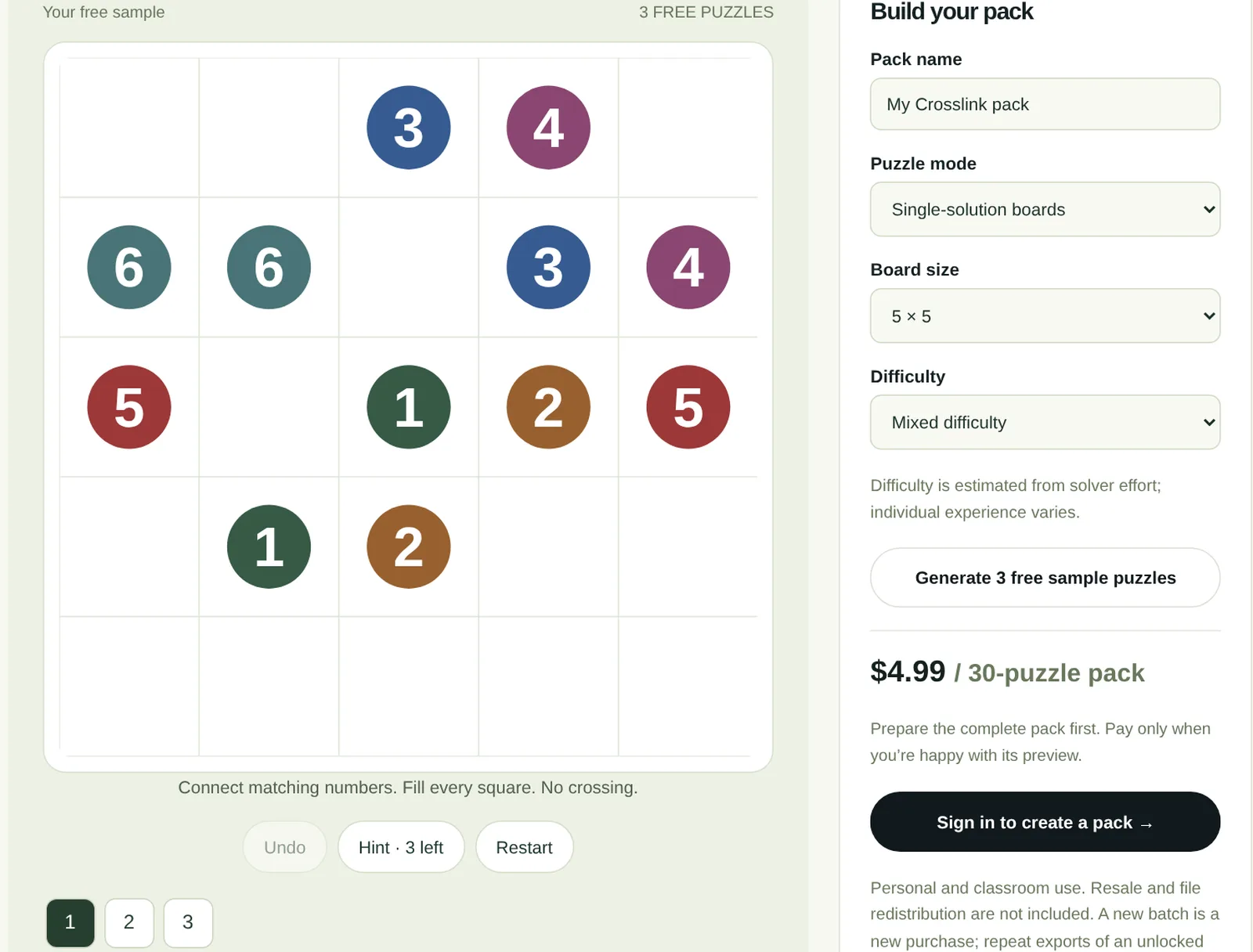
Crosslink is a quiet little logic puzzle. Each number appears twice on the board, and you draw a path that connects every matching pair. The paths cannot cross, and when you finish, every square is filled. Crosslink Creator builds whole packs of these puzzles for you, checks them and lays them out for print, tablet and play on screen. This guide explains how the puzzles work, how to choose the right size and difficulty and what you get in a pack.
The rules in one minute
A Crosslink board is a grid with pairs of numbered dots. Your job is to join each pair with one continuous path.
- Connect matching numbers: the 1 to the 1, the 2 to the 2 and so on.
- Paths move up, down, left and right through the squares, never diagonally.
- Paths can never cross or share a square.
- Every square on the board must be used by a path.
The last rule is what makes it a puzzle. Connecting the pairs is easy; filling every square at the same time takes planning.
Why it works for so many people
There is nothing to memorise and no maths beyond matching numbers, so children pick it up in a minute. Large boards turn into long, winding paths that keep adults busy for a whole coffee. The finished board looks satisfying, a little like a stained glass window of coloured routes.
Teachers like it for early finishers and logic warm ups. Puzzle fans like it because a good board has one clean solution you can reason your way to, without guessing.
How Crosslink Creator works
You choose the settings, the creator builds the puzzles and checks each one before it reaches you. You see the result straight away and can play the sample on screen with undo, hints and restart.
- Name your pack. The name appears on the printed pages and the playable version.
- Choose the puzzle mode: single-solution boards or large boards.
- Choose the board size and the difficulty, or mixed difficulty for a gentle climb through the pack.
- Generate three free sample puzzles and play them on screen.
- When you like what you see, prepare the full 30-puzzle pack, then unlock it with one payment.
Single-solution boards or large boards
The two modes suit different players, so it is worth choosing deliberately.
| Mode | Board sizes | Best for |
|---|---|---|
| Single-solution boards | 5 × 5 and 6 × 6 | Classrooms, beginners and anyone who wants one checked answer. Each board is checked for a single solution. |
| Large boards | 8 × 8 up to 20 × 20 | Long sessions and experienced solvers. Graded by path length; another valid route may exist. |
For a mixed group, start with single-solution boards. The answer key then matches every correct solution exactly.
Choosing the difficulty
Difficulty comes from how much reasoning a board needs, not just its size. You can choose easy, medium, hard or expert, or mixed difficulty for a pack that starts gently and builds up.
Difficulty is estimated from the work needed to solve the board, so it is a guide rather than a promise. Some people find a hard board easy because they spot the key move early. That is part of the fun.
- Ages 6 to 8: single-solution 5 × 5, easy.
- Ages 9 to 12 and casual adults: 5 × 5 or 6 × 6, mixed difficulty.
- Puzzle fans: large boards, 10 × 10 to 15 × 15.
- A real challenge: 20 × 20 large boards with long, winding paths.
What you get in a 30-puzzle pack
When you unlock a pack, you get everything you need to print it, hand it out or play it on a screen.
- 30 puzzles built from your settings.
- Printable PDF editions for A4 and US Letter paper.
- A tablet edition for drawing apps on an iPad or Android tablet.
- Answer keys for every puzzle.
- A playable version that works offline in a browser.
- Repeat downloads of the same pack from My projects.
Packs are for personal and classroom use. Resale and redistribution of the files are not included.
Printing tips
Choose 1, 2 or 4 puzzles per printed page for small boards. Boards from 12 × 12 upward print one per page so the squares stay large enough to draw in.
Print at actual size rather than fit to page, so the grid stays square. A pencil is better than a pen: half the fun of a hard board is rubbing out a path that does not work.
Ideas for using your pack
- A daily puzzle on the classroom board, solved together before lessons start.
- A printed booklet for a long car or plane journey.
- A brain break for a care home activity hour, using 5 × 5 boards with large print.
- A puzzle a day in a family advent calendar or holiday countdown.
- A tablet edition for screen-free evenings with a stylus.
Questions people ask
Is Crosslink Creator free?
You can generate and play three sample puzzles for free. A full pack of 30 puzzles with all the files is a one-off payment, with no subscription.
What age is Crosslink suitable for?
Children from about 6 can solve 5 × 5 easy boards. Large boards up to 20 × 20 challenge experienced adult puzzle fans.
Does every puzzle have only one solution?
Single-solution boards (5 × 5 and 6 × 6) are checked for one solution. Large boards are graded by path length, and another valid route may exist.
Can I use the puzzles in my classroom?
Yes. Packs are licensed for personal and classroom use, so you can print copies for your students.
Can I sell the puzzles?
No. Resale and redistribution of the pack files are not included.
Can I play on a tablet?
Yes. Each pack includes a tablet PDF for drawing apps and an offline playable version for the browser.
PUT IT INTO PRACTICE
Build your own puzzle pack.
Generate three free sample puzzles, play them on screen and only pay when you are happy with the pack.
Open Crosslink Creator →